
Put the advice and the fee under one signature
Send the recommendation, fee schedule and engagement letter as one branded page your client reads and signs.
4.6 out of 5 from 937 G2 reviews

Rated on G2 for document generation, e-signatures and easy admin




Present the advice and the fee together

The advice and the fees together
The recommendation and the fee schedule sit under one signature, so the client agrees to the scope and the cost in a single action.

One standard, however you grew
A book you bought arrives with its own documents. Publish one template and every office sends from it, with your brand and your disclosures fixed.

A document that matches the work
The work arrives as a branded page rather than a Word file with a logo in the corner, and the client sees something that matches the advice behind it.
What the client gets, and what you keep
Recommendation and fee schedule together
Built from the client record in HubSpot or Salesforce, the advice, the fee schedule and the signature sit in one page. The client agrees to the scope and the cost in a single action.
Optional services are presented as choices the client makes, so there is no ambiguity later about what was included.
Explore quotes and payments
A record of what the client accepted
On acceptance the page locks and can't be reversed, deleted or edited. The audit trail records the acceptor's name, email and company.
Answers to your acceptance form appear in the audit trail and the acceptance email, so you can file them with your signed client documents.
Explore e-signature
See who opened it, and how far they read
A proposal like this is rarely read by one person.
Qwilr emails you the first time the client opens the page, and section-level read time shows how far they got. Turn on email verification and each reader confirms their email before the page opens, so the follow-up call goes to the right person.
Explore buyer insights
Control who can open the page
Restrict a page to approved email domains or require email verification, so only the people you sent it to can open it.
Add a view limit, or set the link to expire after a number of days, so an unsigned letter does not sit live indefinitely.
Visit the Trust Center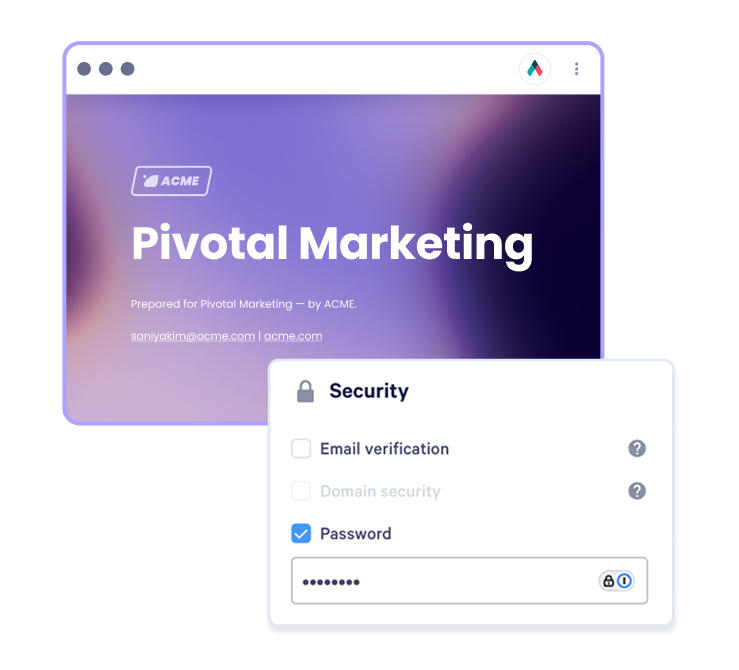
Signing without a per-envelope tool
Many firms run a document tool alongside a signing tool charged by the envelope, and every engagement letter, re-signed scope change and annual review counts as one.
With signing inside the Qwilr page, those documents no longer need a separate signing tool.
Compare Qwilr and DocuSign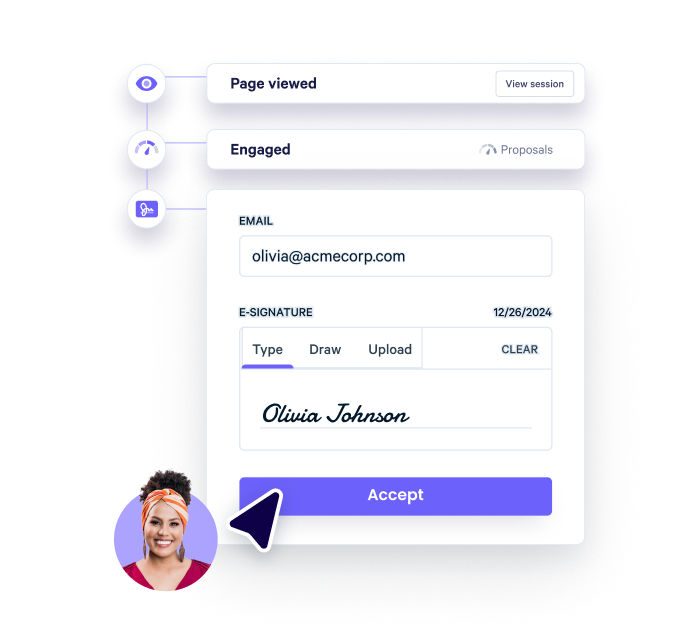
What a file review asks, and where the answer is
Your compliance function will ask for these, and so will anyone running diligence on a book you are buying or selling.
What customers say on G2
Simple to use and looks great
“The templated capabilities are fantastic and allow you to enhance proposals without having to re-invent the wheel.”

Qwilr stood out due to its simplicity and clarity
We quickly discovered that Qwilr offered us many more benefits beyond our initial need. This got us thinking about other areas of the business that would benefit from embedding the solution into their processes.

Automate the process of creating professional proposals
The finished product offers a very professional appearance to prospective clients who instantly feel like they are being courted by a capable and technically advanced agency.

We have been using Qwilr for several years and we love it
“I love the ease of creating a professional and easy-to-read proposal. It is also great to be able to update details on the proposal prior to signoff without re-submitting the whole thing and having to deal with multiple versions.”

We depend on Qwilr
Has made it much easier to create without a designer and just update from one event to the next.
Intuitive Solution, Stellar Support
“I can spin up proposals in under 5 minutes and edit them as I negotiate in real time. We have flexibility in our solutions, and Qwilr allows prospects to pick and choose options to generate a custom quote.”




Questions financial services firms ask
Proposal software for financial services produces the documents a firm sends before work starts: the recommendation, the fee schedule and the engagement letter, with the signature inside the same page. Financial advisers, wealth managers, insurance brokers and mortgage brokers all send a version of it. Once accepted, the page locks and the audit trail records who accepted. For insurance work, the commercial insurance proposal guide covers what to include.
The audit trail records the acceptor's name, email and company, and any answers to your custom acceptance form also appear in it and in the acceptance email. Once a page has been accepted it can't be reversed, deleted or edited. Keep a copy in your own system as well, since no firm with a multi-year obligation should treat a vendor as its archive. More on signing is on the e-signature page.
Up to a point. You can restrict a page to approved email domains, require email verification, set a view limit and set the link to expire after a number of days. Together those keep an unsigned letter from being opened by people you didn't send it to, or sitting live indefinitely.
None of that stops someone screenshotting a page, so treat it as control over casual sharing. The Trust Center covers how Qwilr handles security and data in more detail.
Yes. Present optional services as items the client ticks on or off, or as packages they choose between, and the total updates as they select. What they chose is part of the page they accept, so there is no question later about what was included. Qwilr quotes cover packages, optional items and quantities.
Qwilr publishes its security, compliance and data handling detail on the Trust Center, which is the place to start a review. Payments through QwilrPay run on Stripe. Bring your security questionnaire to the first call and we will work through it with your compliance team.