
Sales reps spend 60% of their time on nonselling work — writing emails, entering data, building quotes, and planning. When they finally get in front of a buyer, the materials they send need to do serious heavy lifting in a very small window.
The challenge for enterprise sales teams is that buying committees keep expanding, attention keeps shrinking, and the materials reps rely on often fall into one of two traps. They're either dense enough to require a decoder ring or so generic they could describe any vendor on the shortlist.
A strong sales one-pager sits in a different category, functioning as high-impact B2B sales collateral that speaks directly to the stakeholder reading it and moves the deal forward.
It speaks directly to the stakeholder reading it, connects a specific pain to a measurable outcome, and makes the next step obvious.
For field sellers managing complex, multi-stakeholder deals, a well-designed one-pager is one of the highest-leverage sales assets in the sales enablement toolkit — closer to a sell sheet built for decision makers than a brochure built for brand recognition.
This guide covers how to structure, write, design, and deliver a sales one-pager that earns attention from the first line and keeps momentum through to signature.
What is a sales one-pager?
A sales one-pager is a one-page document that gives a prospect a clear, concise summary of a product or solution: the problem it addresses, how it works, the value it delivers, and the next step to take. Sometimes called a business one-pager or company one-pager, depending on the context, the format condenses key information into a digestible format that respects the reader's time.
Sales teams use it as a leave-behind after a sales call, a pre-call primer for new stakeholders, or a shareable asset that a champion can forward internally without needing to explain the pitch themselves.
Where a full proposal or pitch deck walks through the details, a one-pager earns the right to that longer conversation and often complements a structured sales presentation. It answers three questions fast: why should I care, what does this do for someone like me, and what happens next.
A marketing one-pager might prioritize brand awareness or social media engagement, but a sales one-pager is built to advance a deal. The core message stays focused on the buyer's pain points, the value proposition, and a clear next step.
Sales one-pager examples
The format, messaging, and level of detail shift depending on where the prospect sits in the buying process and what the sales team needs the document to accomplish.
One-pagers show up at different points in the sales cycle depending on the use case:
- Prospecting: Attached to outbound emails to give cold prospective clients a reason to engage
- Discovery follow-up: Sent after an initial call to reinforce the problem-solution fit before a formal proposal
- Internal selling: Shared by a champion with external stakeholders who weren't in the room, so key information travels without losing clarity
- Event and conference handoffs: Given to potential clients at networking events and trade shows as a tangible reference that outlasts a booth conversation
- Competitive displacement: Positioned against an incumbent by framing specific gaps the current solution leaves open
The following one-pager examples cover the most common use cases enterprise sales teams encounter across prospecting, deal progression, and competitive positioning.
1. Product overview one-pager
A product one-pager gives prospective clients a fast, top-level snapshot of what a product does, who it serves, and why it matters. It fits early in the funnel — attached to outbound emails, handed out at events, or shared after an initial intro call — when the buyer is still evaluating categories, not vendors.
A product overview one-pager includes:
- A one-line description of what the product does and the core problem it solves
- The target audience or buyer profile it serves
- Three to five key features, each tied to a specific benefit
- A brief ROI statement or quantified outcome that signals value without requiring a full business case
- A single call to action, like booking a demo or visiting a product page
2. Problem-solution one-pager
The problem-solution one-pager opens with a clear problem statement — the pain a prospect is already feeling — and positions the product as the direct response. It mirrors how buyers think and aligns closely with approaches like gap selling, where the focus stays on the cost of inaction.
A problem-solution one-pager typically includes:
- A specific, named problem that the target audience recognizes immediately, framed in their language
- Two to three consequences of leaving that problem unaddressed, grounded in operational or financial impact
- A concise description of how the solution addresses each pain point directly
- A measurable outcome that connects back to the pain points and business impact introduced at the top
- A call to action that moves the prospect toward a conversation, not a commitment
3. ROI-focused one-pager
When a buying committee needs internal justification to approve spend, the conversation shifts from features to financials. An ROI-focused one-pager becomes critical when deals move into later stages of the SaaS sales cycle and require financial justification. Champions also use it as an attachment to internal budget requests.
Where a product overview creates interest, an ROI one-pager creates urgency by quantifying what inaction costs. It includes:
- A headline metric or financial outcome that anchors the entire page — revenue gained, cost reduced, or time recovered
- A breakdown of how that outcome is calculated, using inputs the prospect can verify against their own numbers
- A before-and-after comparison showing current-state costs against projected post-implementation performance
- Supporting data points from customer results, industry benchmarks, or proprietary research
- A call to action directed at the next approval step, such as scheduling a business case review
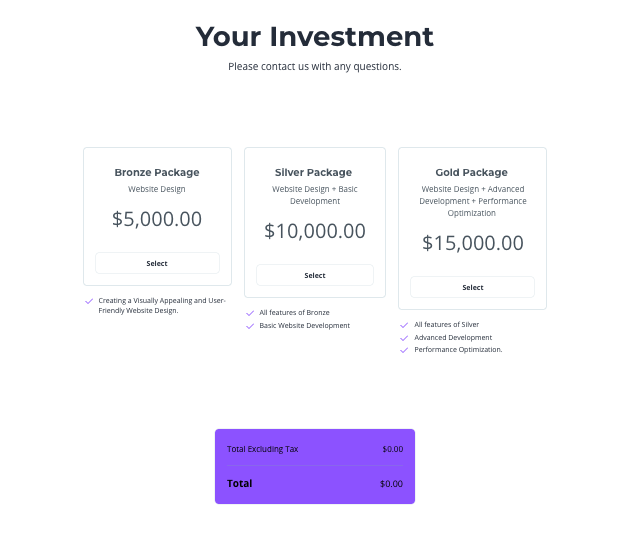
If the one-pager includes pricing information, use Qwilr’s quotes and dynamic pricing tables to present different pricing options or packages in a clear, easy-to-read format.
4. Use case one-pager
A use case one-pager narrows the lens from what a product does broadly to how it solves a specific problem for a specific team, role, or workflow. It bridges the gap between general product awareness and a tailored proposal, answering the question every stakeholder asks internally: "How would this work for us?"
Mid-funnel conversations are where this format carries the most weight. It typically includes:
- A named scenario describing the team, workflow, or operational challenge being addressed
- A short description of how the current process works without the solution, including specific friction points
- A walkthrough of how the product fits into that workflow, focused on user actions rather than backend functionality
- A before-and-after contrast that makes the improvement tangible — fewer steps, faster turnaround, reduced manual effort
- A call to action tied to seeing the product in context, such as a tailored demo or pilot
Note: Products that serve multiple buyer personas benefit from separate one-pagers for each, because pain points, vocabulary, and success metrics differ across teams.
Qwilr allows users to create visually engaging, interactive case studies that showcase past projects and client success stories.
And with interactive features, like clickable buttons, embedded forms, and integrated documents (such as price lists or proposals), one-pagers provide a more engaging experience for potential clients.
5. Industry-specific one-pager
Horizontal products that serve multiple verticals face a recurring problem: generic messaging signals that the vendor hasn't done the work to understand the buyer's world. An industry-specific one-pager reframes a broad product around a single vertical's regulatory requirements, technical environment, and operational norms.
One product page on a website speaks to everyone. An industry-specific one-pager speaks to one buyer in one target market.
- A clear statement of the industry-specific challenge, using terminology the buyer's team uses internally
- Relevant compliance, regulatory, or security requirements the product meets in that vertical
- Features or integrations pulled forward from the broader feature set based on what matters most in that industry
- A customer result or proof point from a comparable organization in the same vertical
- A call to action that references the buyer's context, such as a consultation focused on their industry's requirements
6. Feature deep-dive one-pager
Some deals stall because the buyer can't visualize how a single capability works in practice. A feature deep-dive one-pager isolates one feature and explains it thoroughly — what it does, how a user interacts with it, and what outcome it produces. This format fits late-stage evaluations where the prospect has already narrowed the shortlist and needs granular detail to make a final call.
It becomes especially useful when buyers are comparing tools like the best proposal software or evaluating specific capabilities. The one-pager includes:
- The specific feature and the problem it solves within the broader product
- A step-by-step walkthrough or visual showing the feature in action
- Key benefits framed around time saved, errors reduced, or workflows simplified
- A screenshot, diagram, or workflow illustration that makes the functionality concrete
- A call to action pointing toward a hands-on trial, sandbox environment, or technical demo
Resist the temptation to pack in adjacent features. The discipline of this format is focus — one feature, explained well enough that a prospect can assess fit without a live walkthrough.
7. Comparison one-pager
Buyers evaluating multiple vendors build their own comparison grids, whether or not a sales team provides one. A comparison one-pager takes control of that narrative by framing differentiators on the vendor's terms, highlighting where the product leads and where alternatives fall short.
This format lands hardest at the bottom of the funnel, when procurement is scoring vendors or a champion needs ammunition to justify their recommendation internally. It could cover:
- A side-by-side table comparing two to four solutions across the criteria that matter most to the buyer
- Key differentiators called out with brief context, not just checkmarks
- A "best for" summary that positions each option for a specific use case or buyer profile
- Proof points or data that substantiate the comparison rather than relying on subjective claims
- A call to action inviting the prospect to validate the comparison through a demo or reference call
8. Case study snapshot one-pager
A full case study can run several pages. A case study snapshot condenses that narrative into a single page built for speed, giving the buyer enough social proof to build customer trust without requiring them to read a long-form document.
A great example of an effective one pager is a case study snapshot that mirrors the reader's industry, company size, and business challenge simultaneously.
Seeing a comparable organization achieve measurable results reduces the perceived uncertainty of moving forward. A case study snapshot includes:
- The client's industry, company size, and relevant context in one to two sentences
- The specific challenge or pain point that triggered the engagement
- The solution delivered, described in concrete terms rather than abstract capabilities
- Measurable results with specific numbers — percentage improvements, time saved, revenue impact
- A direct customer testimonial from the client stakeholder who owned the project
9. Integration-focused one-pager
For operations teams, IT leaders, and RevOps buyers, a product's value often depends less on what it does standalone and more on how it connects to the systems already in place. An integration-focused one-pager addresses that concern directly by showing how the product fits into an existing tech stack.
This format resonates with technical evaluators who need to assess compatibility before they'll advocate internally. It typically includes:
- A list of supported integrations relevant to the buyer's stack, prioritized by the ones that matter most in their workflow
- One to two workflow examples showing how data moves between the product and connected systems
- Setup requirements and implementation complexity — how long it takes and what resources are involved
- Security or compliance standards the integrations meet, particularly for buyers in regulated industries
- A call to action aimed at a technical review, integration consultation, or sandbox walkthrough
10. Executive summary one-pager
An executive summary one-pager distills a complex solution, strategy, or recommendation into a format designed for time-constrained decision-makers who need the bottom line before anything else.
This format is built for internal circulation — the kind of document a VP forwards to the C-suite with "worth a look" in the subject line. It generally covers:
- Two to three key insights or findings that frame the opportunity or problem at a strategic level
- A concise recommendation or proposed course of action
- Expected outcomes tied to business metrics the reader already tracks
- Supporting evidence kept to a minimum — one or two data points, not a full research appendix
- A clear next step that requires minimal effort from the reader, such as approving a meeting or greenlighting a pilot
11. Event and campaign one-pager
Trade shows, product launches, and seasonal campaigns create a narrow window where attention is high but follow-through is uncertain. An event one-pager captures that momentum as a tangible reminder of why the conversation started and what to do next.
Unlike a product overview, this format is built around a specific moment. The messaging ties directly to the event's theme, a new release, or a limited-time offer that gives the prospect a reason to act within a defined window. Most often, it includes:
- A headline tied to the event, launch, or campaign that anchors the one-pager in a specific context
- A brief description of what's being promoted and why it matters right now
- Two to three key highlights — new features, exclusive offers, or partnership announcements relevant to attendees
- Social proof or a data point that reinforces urgency without resorting to pressure tactics
- A call to action with a clear deadline or next step, such as booking a post-event demo or claiming an offer
Timing determines this format's shelf life. Pair it with a post-event outreach sequence and follow up emails that reference the same messaging to keep potential clients engaged after the initial handoff.
12. Partnership one-pager
Co-selling and channel partnerships introduce a wrinkle that single-vendor materials can't address: the buyer needs to understand the combined value of two products working together, not just one. A partnership one-pager frames that joint value proposition clearly enough that both sales teams can use it in their own sales conversations.
This usually includes
- A statement of the shared problem both products solve together that neither addresses as well independently
- A description of how the integration or partnership works in practice — what connects, what data flows, and what the user experience looks like
- Distinct benefits each product contributes to the partnership, so the buyer sees complementary strengths rather than overlapping features
- A customer example or use case showing the partnership in action
- A co-branded call to action that routes the prospect toward the right team, whether that's a joint demo, a partner landing page, or a shared sales contact
13. Objection-handling one-pager
Every sales team hears the same objections on repeat — pricing concerns, implementation timelines, security requirements, or skepticism about switching costs. An objection-handling one-pager pre-empts those concerns by addressing them head-on in a format the prospect can review independently or share with internal skeptics.
This format works best when a rep knows the specific objection blocking a deal and needs something more structured than a verbal response to move the conversation forward. It commonly consists of:
- The sales objection stated plainly, in the buyer's own language rather than a sanitized version
- A direct response backed by data, customer evidence, or a concrete explanation of how the concern is addressed
- A supporting proof point — a customer quote, benchmark, or third-party validation that reinforces the response
- Context that reframes the objection within the broader unique value proposition of the solution
- A call to action that invites the prospect to test the claim, such as a pilot, reference call, or technical review
Building a library of objection-handling one-pagers organized by concern gives sales reps a ready-made resource for the most common deal blockers. Reps save time on repetitive responses, and the messaging stays consistent across the team.
14. Implementation and onboarding one-pager
Procurement and operations teams often hesitate at the point of commitment because they can't see what happens after the contract is signed. An implementation one-pager removes that uncertainty by mapping out the onboarding process in a format that makes the transition feel manageable for project managers and stakeholders alike.
It includes:
- A phased onboarding timeline showing what happens in week one, month one, and beyond
- Clear ownership for each phase — what the vendor handles and what the buyer's team is responsible for
- Key milestones and checkpoints that signal progress, such as data migration completion, team training, or first workflow live
- Available support resources including dedicated account managers, documentation, and training sessions
- A call to action aimed at scheduling a scoping call or reviewing a detailed implementation plan
Specificity matters here more than in almost any other format. Vague promises about "seamless onboarding" or "dedicated support" carry no weight with an operations lead evaluating three vendors. Concrete timelines, named resources, and defined responsibilities build the confidence needed to move from verbal agreement to signed contract.
15. Pricing one-pager
Pricing is one of the most requested and most mishandled pieces of sales collateral. Too much detail overwhelms the buyer before they understand the value. Too few triggers follow-up emails that slow the deal. A pricing one-pager strikes that balance by presenting cost structures clearly enough for a budget conversation without turning into a full commercial proposal.
This format fits mid-to-late-stage deals where the buyer has expressed intent and needs to socialize costs internally. It covers:
- A pricing structure overview — per-seat, tiered, usage-based, or custom — with enough detail for the buyer to understand how costs scale
- A breakdown of what each tier or package includes, focused on the capabilities that differentiate each level
- Add-ons, implementation fees, or variable costs flagged transparently so the buyer isn't surprised later
- A brief value anchor — a ROI figure, cost-per-outcome metric, or customer benchmark that frames the price against the return
- A call to action directing the buyer toward a pricing consultation, custom quote, or interactive pricing experience
Avoid locking this one-pager into specific dollar amounts if pricing is negotiable or changes frequently. Framing the structure and logic behind pricing gives the buyer only what they need to move the conversation forward internally, while leaving room for a tailored quote once the scope is confirmed.
How to create a sales one-pager that drives action
A one-pager can have the right content and still underperform because of how it's structured, designed, or delivered. The creation process matters as much as the content itself. The following practices cover the decisions that shape whether a good one pager earns attention or loses it.
Lead with a headline that names the problem or outcome
A headline built around the product name or a generic tagline gives the reader no reason to invest another second. Compare these two approaches:
- "XYZ Platform: Next-Generation Revenue Intelligence" — tells the reader what the product calls itself
- "Cut forecast variance by 40% with real-time pipeline visibility" — tells the reader what they get
The second version works harder because it leads with a result the buyer is already trying to achieve. It signals relevance before the reader processes a single detail about the product.
Strong one-pager headlines follow a pattern. They name a specific pain point, a measurable outcome, or a scenario the reader recognizes from their own day-to-day. They avoid vague language like "streamline operations" or "drive growth" in favor of language grounded in the buyer's reality. The headline's job is to capture the reader's attention before anything else on the page.
Structure content for scanning
Most stakeholders will scan for the section relevant to their role, extract key details and key points, and decide in seconds whether to engage further or move on.
Place the most critical information — the problem, the outcome, the proof — in the top third of the page where it's visible without scrolling or flipping. Group related details under clear subheadings so a CFO can jump to ROI and an IT lead can jump to integrations without wading through irrelevant sections.
A few structural principles that support fast comprehension:
- Keep paragraphs to two or three sentences maximum so the main point of each section is immediately clear
- Use bullet points for lists of features, benefits, or requirements rather than embedding them in prose
- Bold key figures or outcomes so they're visible during a quick scan
- Maintain consistent spacing between sections so the page feels organized rather than crowded
White space is functional. Generous spacing between sections gives the eye natural resting points and makes individual elements easier to isolate. An easily digestible format keeps decision makers moving through the page rather than abandoning it.
Use visuals that carry information
Visual aids earn their place on a one-pager when they do work that text cannot do as efficiently. Stock photography, decorative icons, and generic illustrations consume space without advancing the reader's understanding and on a single page, every square inch matters. Visual elements and design elements that pull their weight include:
- Comparison tables that let the reader evaluate options at a glance
- Simple charts or graphs that quantify a result or trend
- Product screenshots showing the actual interface a buyer would use
- Workflow diagrams mapping how the product connects to existing systems or processes
- Before-and-after layouts that make an improvement tangible
Anchor claims in data or proof
Unsupported benefits read like marketing copy. A claim like "reduces onboarding time" invites skepticism. "Reduced onboarding time by 35% for a 200-person sales team" gives the reader — and every stakeholder the champion forwards it to — something concrete to evaluate.
Proof points that strengthen a one-pager include:
- Customer metrics tied to a named outcome — percentage improvements, time saved, revenue impact
- Industry benchmarks from recognized sources that contextualize the claim
- Direct customer testimonials attributed to a named person and role
- Third-party validation like analyst findings, review platform ratings, or awards
End with one clear call to action
A one-pager with two or three calls to action — "book a demo, visit our website, download the whitepaper" — asks the reader to make a choice at the exact moment they should be making a move.
For example:
- Early-stage one-pagers point toward a conversation: "Book a 15-minute intro call."
- Mid-funnel documents push toward validation: "Schedule a tailored demo" or "See it in your environment."
- Late-stage materials aim for commitment: "Review the proposal" or "Start your pilot."
Make the CTA visually distinct from the rest of the page — a button, a bolded line, a clearly separated section — so it's impossible to miss during a scan. A clear call to action with enough specificity that the reader knows just what happens after they act separates a good one pager from one that stalls. "Get in touch" is vague. "Book a 20-minute pipeline review with our team" tells the prospect exactly what they're committing to and what they'll get from it.
Design for how the one-pager will travel
A one-pager rarely stays with the person who receives it first. A champion forwards it to their VP while a procurement lead prints it for a review meeting. How the document performs across those contexts depends on decisions made before it's ever sent.
Designing for travel means accounting for these realities:
- Test the one-pager on mobile screens, not just desktop — a significant percentage of stakeholders will open it on a phone first
- Ensure the file size is small enough to attach to an email without triggering spam filters or download friction
- Include the company name, contact information, and a URL on the document itself so essential information and business information remain accessible even when the one-pager is separated from the original email thread
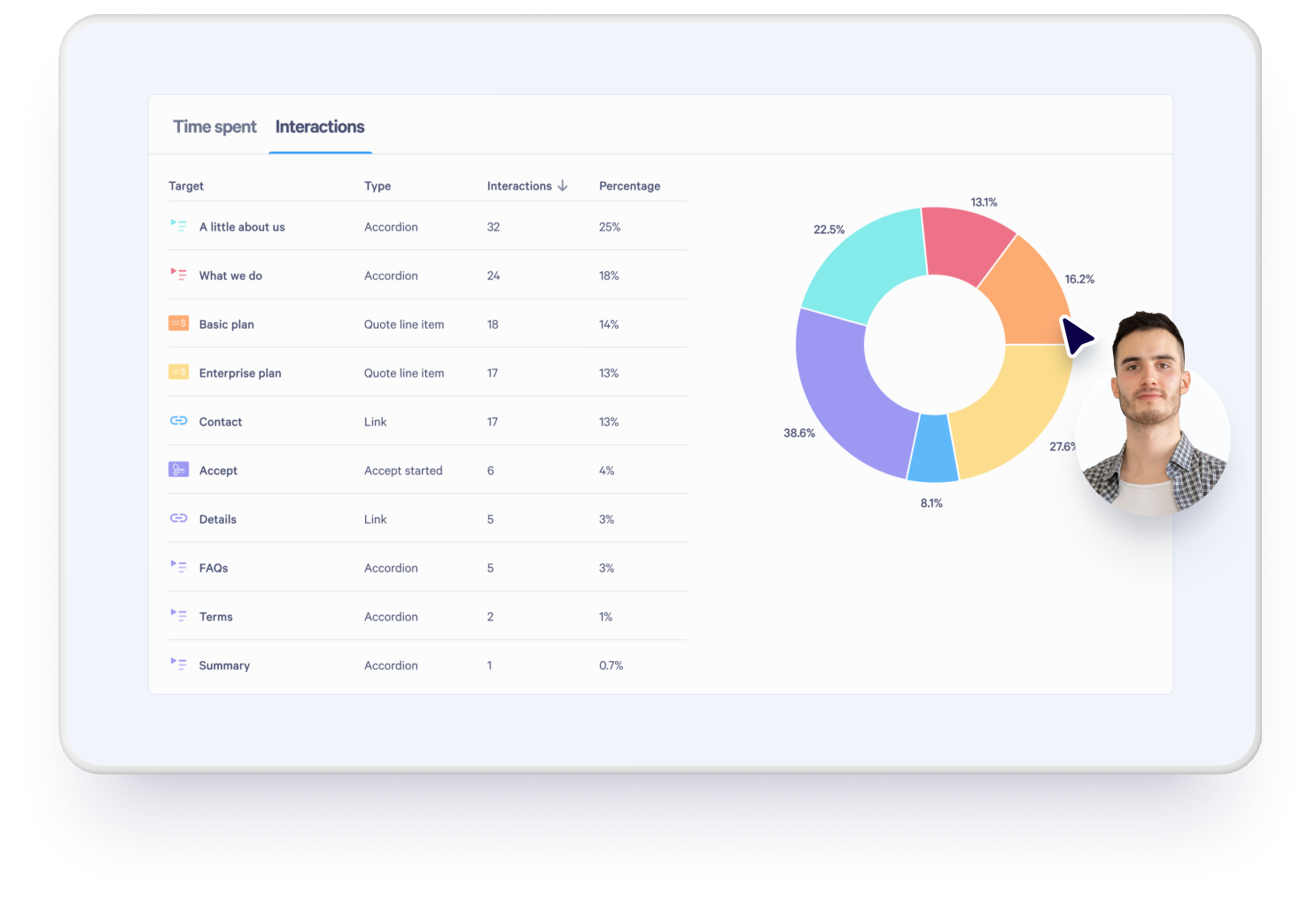
- For web-based formats, track engagement so the sales team knows when the document is opened, forwarded, and which sections receive attention
Qwilr's proposal analytics show when a one-pager is viewed, how long each section holds attention, and whether it's been shared with additional stakeholders.
Make a one-pager that moves deals forward with Qwilr
An effective one-pager has to earn its place in an inbox, survive being forwarded across a buying committee, and still communicate its value proposition when the sender isn't in the room. Static PDFs and generic one-pager templates make that harder than it needs to be.
Qwilr gives sales teams a faster way to make a one-pager that matches how modern buyers evaluate, share, and approve. With a drag-and-drop editor, reps can build polished, on-brand sales content in just a few clicks.
About the author

Kiran Shahid|Content Marketing Strategist
Kiran is a content marketing strategist with over nine years of experience creating research-driven content for B2B SaaS companies like HubSpot, Sprout Social, and Zapier. Her expertise in SEO, in-depth research, and data analysis allow her to create thought leadership for topics like AI, sales, productivity, content marketing, and ecommerce. When not writing, you can find her trying new foods and booking her next travel adventure."